Purpose
NEOCP Machine is a Windows GUI for the observing workflow around the MPC NEOCP and PCCP lists. The current focus is finding useful target candidates: loading current lists, deriving residuals and motion preferably with Find_Orb, evaluating observability from field size, limiting magnitude and Tycho stacking, and reporting changes visibly.
In this phase the application intentionally runs in dry-run mode. ASCOM simulators are detected, but real camera or mount commands are not sent without explicit future enablement.
Startup and Updates
On startup the app loads configuration and live state from the data folder, restores the last tables and checks the published website versions.txt after a short delay. If the website announces a higher version, an update notice is offered.
The GUI uses a single-instance lock per data folder. If the same instance is already running, a message is shown instead of opening a second main window.
The title bar shows the station, station date, UTC time, station time with time-zone abbreviation and UTC offset, plus the countdown to the next MPC refresh.
Main Window
The window consists of a collapsible configuration block on the left and the working area on the right. At the top right are status, the day/night graph and the live log. Below that is the upper tab area with target planning, provisionally disappeared objects, NEOCP/PCCP overview, own observations, limiting model, events and live state.
Tables use a monospaced font. Numeric values are right-aligned. Column headers sort the visible table; manual sorting is not saved when the program exits. Column widths are saved permanently.
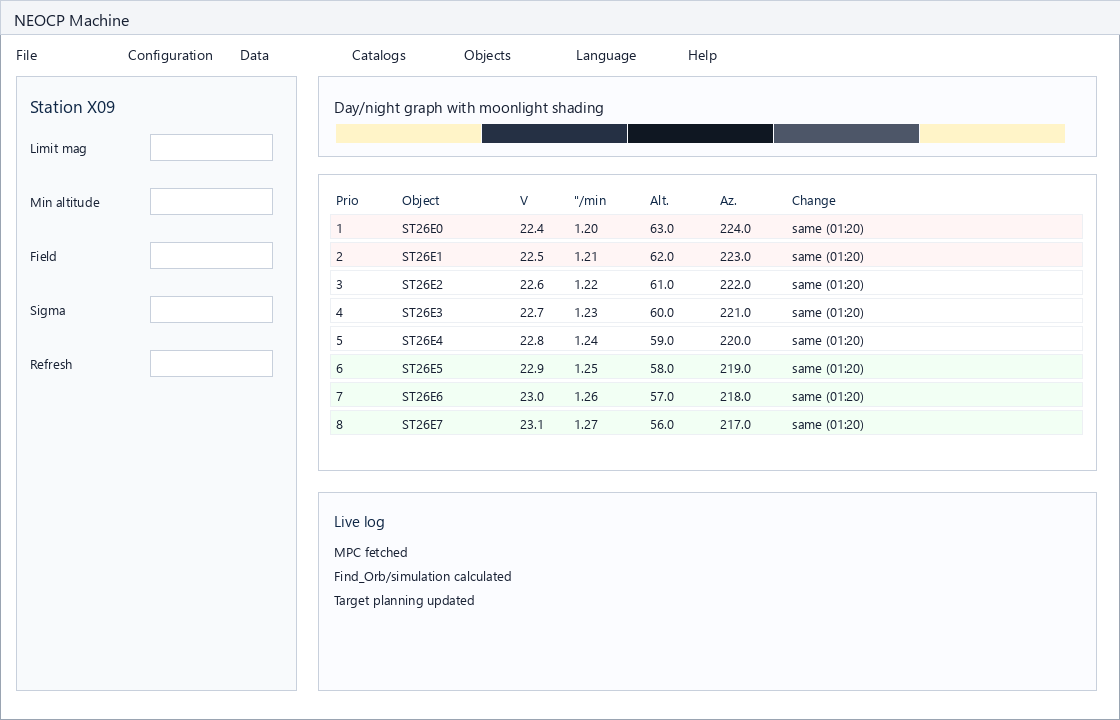
Left Configuration Panel
All input fields have detailed hover text. Changes are saved continuously. The configuration block can be collapsed; the handle remains visible so it can be reopened.
| Field | Meaning |
|---|---|
| Station code | MPC observatory code. Lookup fills station name, latitude and longitude from the MPC source. |
| Station name | Used for the title bar, time-zone detection and logging. Known locations such as Chile/Rio Hurtado are mapped to the matching time zone; otherwise longitude is used as a fallback. |
| Latitude, longitude east | Geographic coordinates in degrees. Longitude is positive eastward; western longitudes may appear as 360-based values from MPC tables. |
| MPC refresh s | Automatic fetch interval for the MPC tables. Below five minutes a warning is shown because of possible IP blocking; below one minute and above thirty minutes values are refused. |
| Exposure s | Default exposure for simulated single exposures and status displays. |
| Model x s | Reference time for the limiting-magnitude model: which limiting magnitude is expected in this exposure time? |
| Model until Sun | Solar altitude down to which zenith exposures are collected for the model. Default: -15 degrees. |
| Field W x H | Image-field width and height in arc minutes. FITS analysis can apply these values. |
| Rotation | Image-field rotation in degrees. Saved for later field checking and FITS diagnostics. |
| Residual factor | Fraction of the field diagonal that is accepted as allowed residual. |
| Sigma | Detection threshold for the 3-sigma exposure calculation. |
| Limit mag @s | Simulated limiting magnitude and corresponding reference time. FITS or stack estimates can update these values. |
| Max single s | Limit above which the app evaluates Tycho stacking instead of single exposure. |
| Tycho subs / Tycho max frames | Subframe length and maximum frame count. Target planning always evaluates three Tycho stacks. |
| Target refresh s | Interval for target planning. The app warns or refuses extreme values as it does for the MPC refresh. |
| Usable field % | Percentage of the field that must be usable for crossing-time calculation. The value is stored as an integer. |
| Dry run | Currently fixed on. The app simulates camera, mount and focus commands. |
| ASCOM drivers | Selection of discovered camera, mount and focuser drivers. |
| Tycho / find_orbit | Discovered program paths. If a component exists, the install button is disabled and the path can be copied through the hover text. |
| Plate-solve command | CLI command for a local plate solver. Placeholders such as {image}, {output}, {tycho} and {find_orbit} are replaced. |
| Load FITS | Loads one or more FITS files, analyzes header data and stores the result until the next analysis. |
Status and Day/Night
The status block lists ASCOM detection, drivers, Tycho, Find_Orb, NEOCP/PCCP counts, internet status and automation state. If the internet connection is missing, a bold red blinking line is shown.
The day/night graph shows 24 hours with the current time in the middle. The scale marks full three-hour steps as 00h, 03h and so on. Labels can be switched between UTC and station time.
| Marker | Meaning |
|---|---|
| SR / SS | Sunrise and sunset at the bottom of the graph. |
| MR / MS | Moonrise and moonset at the top of the graph. |
| Moon bar | Upper bar down to about one third of graph height. The brighter the Moon, the brighter the night area becomes. |
Target Planning
The Target Planning tab contains the calculated candidates. Only objects within the configured brightness and motion filters appear. The altitude limit does not hide objects: targets below it remain visible and are marked. If a filter hides objects, the label of the respective limit field blinks slowly.
| Column | Content |
|---|---|
| # | Running number from the initial sort. |
| Object | NEOCP/PCCP designation. Double-click opens a local object page. |
| Prio | Internal observing score. Higher means more urgent. Formula: residual + 0.35 x drop + brightness bonus + 1000 if the residual is outside the limit. |
| Resid " | Residual in arc seconds. Find_Orb has priority; simulated values are marked dark red. |
| RA / Dec | Calculated position for the time shown above the table. RA in hours/minutes, Dec rounded to whole arc minutes. |
| V | Visual magnitude from the MPC table, one decimal place. |
| "/min | Proper/apparent motion in arc seconds per minute. Find_Orb/OBS80 data is preferred. |
| Altitude / Limit | Current object altitude and next crossing above or below the configured altitude limit. Targets below the limit remain visible and are marked. |
| 3 sigma exp | Required exposure time for the sigma detection threshold, one decimal place. |
| Usable field s | Whole seconds until the object crosses the configured usable part of the field. |
| Tycho Stack | Evaluation of three Tycho stacks with subframe length and frame count. |
| Drop | Urgency estimate for when an object will probably receive a provisional designation and disappear from NEOCP. |
| MPC Update | Short update text, for example Upd May 23.48 UT (02:15). |
| Obs | Number of observations from the current MPC row. |
| Arc | Observation arc from the current MPC row, formatted as dd:hh:mm. |
| Change | Short status same, new obs or new with age in parentheses as hh:mm. |
Colors and Blinking
The Colors? button opens the same explanation directly in the app. The Colors on/off/old button toggles colors and blinking.
| Display | Meaning |
|---|---|
| Light red to dark red | New observations are less than 3 hours old. The fresher they are, the stronger the color. |
| Light green to dark green | No new data for at least 3 hours. After 12 hours the green is strongest. |
| Dark red blinking | Newly published object within the last 6 hours. |
| Dark red text | At least one table value is simulated. |
| Gray text | OBS80 lines with the own station code exist for this object. The row remains sortable and clickable. |
| Drop cell blinking | Only the drop cell blinks. Medium values blink slowly, critical values quickly. |
Tabs
| Tab | Content |
|---|---|
| Target Planning | Current prioritized observing plan. |
| Prov. | Objects that disappeared from NEOCP/PCCP since startup are shown only when the MPC ToConfirm_PrevDes index reports an assignment. The app shows the provisional designation and MPEC; if the MPC entry has no MPEC, it shows the alternate designation or MPC status such as was not confirmed. Pure open placeholders are not shown. |
| NEOCP / PCCP | Direct overview from the MPC tables with current positions, observation counts and magnitudes. |
| Own Obs | OBS80 lines containing the own station code. A local sortable HTML table can also be opened. |
| Limit model | Zenith and FITS-based measurement points for the limiting-magnitude model. |
| Events | Live log of current work steps. |
| Live State | Raw view of the saved live state for diagnostics. |
Object Page
A double-click on an object opens a locally generated HTML page. It contains current values, a Find_Orb-like text view, an ephemeris, a chart area and link status for the Bill Gray page.
If the Bill Gray file does not yet exist, the page notes that the file may become available up to one hour later. The link remains clickable.
The local ephemeris starts at the last full hour in the past and runs for 48 hours at 10-minute spacing. It lists RA, Dec, V, motion, geocentric distance, solar distance, azimuth, altitude, solar elongation, lunar elongation, Moon illumination and the value source. Position, altitude and azimuth are recomputed for every entry; simulations are marked.
Menus And Parameters
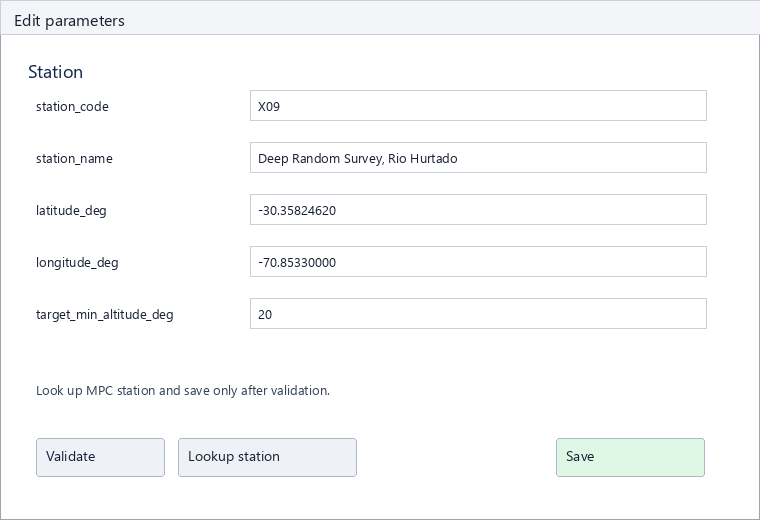
Configuration > Edit parameters opens a structured setup dialog for the main parameters. It validates numeric ranges, required fields and choices and saves only after validation succeeds. The additional JSON editor remains available for diagnostics and also has Validate; missing or unknown fields prevent saving.
The Help menu opens local help, the HTML manual, the PDF manual, update checking and the overview of external modules, data sources and terms. The top menus are available in German and English.
Star Chart
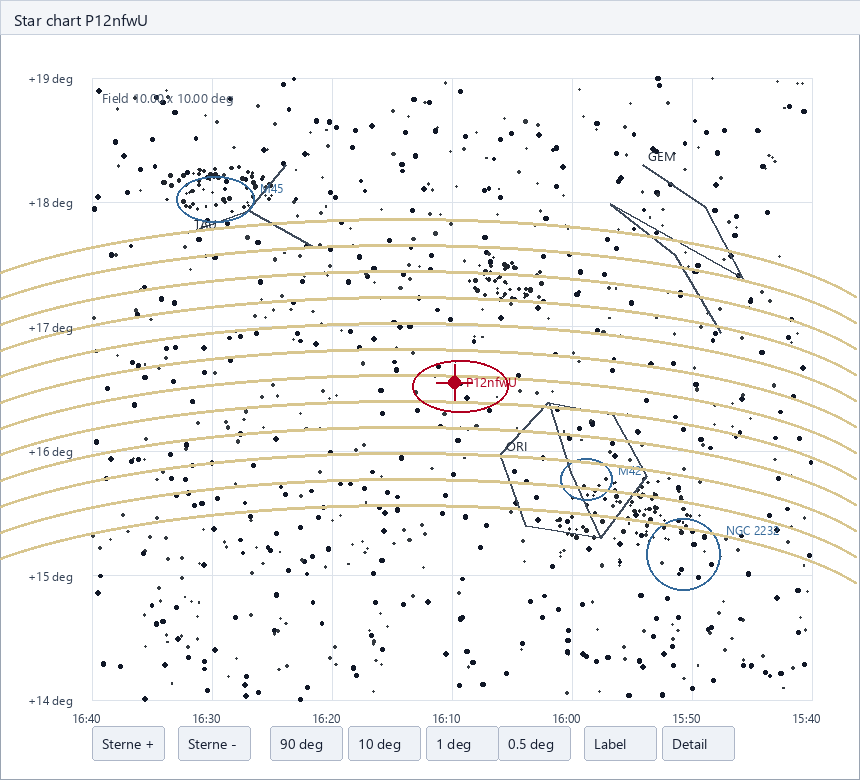
The hover chart uses the fast BigSky direct view for wide fields. If a local Gaia DR3 catalog exists, fields up to 3 degrees automatically switch to Gaia. The mouse wheel zooms out to 90 degrees and in to 0.25 degrees. Detail deliberately enables the slower view with constellation lines, boundaries, deep-sky objects and Milky Way outlines. Label toggles deep-sky labels.
Other filtered NEOCP/PCCP objects in the field are drawn in blue and listed with V and motion. The target position also shows an uncertainty ellipse when local planning data are available. Export creates a finder HTML page with a 2-degree chart, ephemeris, altitude graph and Find_Orb block.
Own MPC Observations
During MPC refresh the app loads OBS80 data for the read objects and searches for the own station code at the end of the lines. Matches are shown in Own Obs. In the NEOCP/PCCP and target tables the affected object rows are shown in gray but remain fully usable.
FITS Analysis
The analysis is saved and survives program exit until new FITS files are analyzed. During analysis the app shows a progress bar.
Field Calculation
The app first determines the plate scale in arc seconds per pixel. The order is:
- Explicit header values such as
SECPIX,PIXSCALE,SCALE. - WCS values from
CDELT1/2or the CD matrix. - Optical approximation:
206.265 x pixel_size_um / focal_length_mm.
Then: field_width' = NAXIS1 x scale / 60 and field_height' = NAXIS2 x scale / 60. The binning factor is not multiplied again when the pixel size given in the header already is the effective binned pixel size. The diagnostics therefore also show how large the error would be if binning were applied a second time.
Limiting Magnitude
If a FITS header contains limiting-magnitude fields such as LIMMAG, MAGLIM, LIMITMAG or LMAG, those are preferred. If they are missing, the app creates a non-catalog-calibrated noise/SNR estimate from the preview. For multiple images a stack approximation is built from the total exposure time.
A double-click on a FITS row opens scrollable header cards on the left and a double-size automatically scaled preview image on the right. The arrow button opens the FITS file in the Windows default app.
Automation
There is only one automation switch. When switched on, the app asks whether the run should be active only this time or permanently at app startup. Green means active for this run; dark green means permanently active. When switched off, the app likewise asks for only now or permanently off.
The sequence is: determine sunset, regulate the camera to about 50 percent cooling power or ambient minus 20 degrees, respect the absolute camera limit, slew near the zenith when the Sun is below -10 degrees, check histogram and stars, check plate solving/focus and continue exposing until the model limit.
Tray Mode
When minimized, the app moves to the Windows tray. New objects make the tray icon blink; the hover text names the affected objects. Blinking ends only when the window is opened from the tray. Window size and position are saved and used when restoring.
The tray menu can show object changes since startup, read new objects aloud again and cancel running announcements. The speech function reads backwards, newest object first, spells the designation slowly and adds the rounded magnitude class. Automatic repetitions use doubled spacing each time and stop after four announcements in total or on mouse movement.
Cancel announcement runs in the background and no longer blocks the UI. Repetitions stop immediately; the Windows SAPI cancellation is then sent asynchronously to the speech engine.
Check Web Downloads
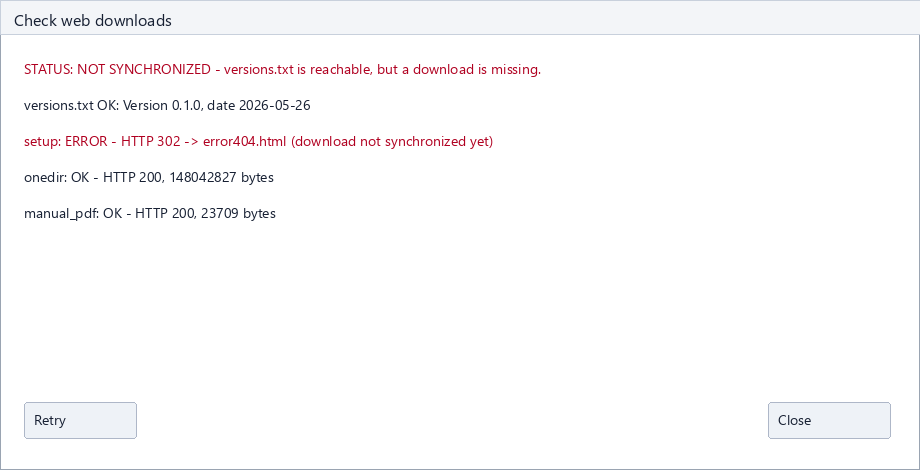
Check web downloads is not a cloud sync operation. It reads the published versions.txt, checks download URLs and compares file sizes and SHA256 values where local files are available. If the setup is not yet publicly synchronized, the app marks the onedir package as the temporarily recommended download.
Calculations
| Value | Calculation |
|---|---|
| Residual limit | residual_factor x sqrt(width^2 + height^2) x 60 in arc seconds. |
| 3-sigma exposure | reference_time x 10^((V - limit_mag) / 1.25) x (sigma/3)^2, limited to 0.5 to 3600 seconds. |
| Usable field time | usable_field_% x field_diagonal x 60 / motion, then converted to seconds. |
| Tycho stack | 3 x frames x subexposure. Frames are derived from the required exposure time and capped by Tycho max frames. |
| Drop | 100 / (1 + remaining_days). Without external MPEC statistics the app uses 5.5 days + 0.35 x arc as expectation. |
| Prio | residual + 0.35 x drop + max(0, 22 - V); outside the residual limit 1000 points are added. |
Storage Locations
By default configuration, live state and logs are stored under %APPDATA%\NEOCPMachine. Cache files such as FITS analysis, object pages, OBS80 cache, the Gaia DR3 catalog and temporary diagnostics are stored under E:\codex\NEOCPMachine\cache. For tests, an alternative data folder including the cache can be selected through the CLI or the NEOCP_MACHINE_HOME environment variable.
CLI
The separate CLI EXE starts no GUI. It is used for diagnostics, smoke tests and one-time MPC fetches.
| Parameter | Function |
|---|---|
--help | Show help. |
--version | Print version. |
--state-dir PATH | Use an alternative data folder. |
--diagnose | Print hardware and software diagnostics as JSON. |
--fetch-once | Fetch MPC once and save target planning. |
--mpec-stats | Currently not visible in the GUI; the CLI can still generate the statistics. |
--build-gaia-catalog --gaia-mag 15 | Build the local Gaia DR3 catalog to G<=15. Without an explicit limit the separate script also assumes 15. |
--gaia-output-dir PATH | Target directory for the Gaia catalog. The app offers documentation, progress display and folder opening in the Catalogs menu. |
--self-test | Offline parser, storage and model test. |
External Modules, Data Sources And Terms
The app also lists this overview in the Help menu. The generated package list is available as bundled_modules.html.
- Python and standard library: https://www.python.org/
- Tk/Tcl through tkinter: https://www.tcl.tk/
- pywin32/pythoncom for Windows SAPI: https://github.com/mhammond/pywin32
- comtypes for ASCOM COM access: https://github.com/enthought/comtypes
- pystray and Pillow for tray icon and images: https://github.com/moses-palmer/pystray, https://python-pillow.org/
- pyarrow/Parquet for local star and Gaia catalogs: https://arrow.apache.org/
- starplot/astropy as optional chart and constellation helpers: https://github.com/steveberardi/starplot, https://www.astropy.org/
- MPC NEOCP/PCCP, PrevDes, MPEC, OBS80 and observatory-code data: https://www.minorplanetcenter.net/iau/NEO/toconfirm_tabular.html
- Project Pluto, Find_Orb and NEOCP2 pages: https://www.projectpluto.com/find_orb.htm
- ESA Gaia DR3/TAP: https://www.cosmos.esa.int/web/gaia/dr3
- OpenNGC deep-sky data: https://github.com/mattiaverga/OpenNGC
- JPL DE421 ephemerides: https://ssd.jpl.nasa.gov/planets/eph_export.html
- ASCOM and Tycho Tracker remain external installations with their own terms: https://ascom-standards.org/, https://www.tycho-tracker.com/
These sources remain under their respective licenses and terms. NEOCP Machine stores them locally only for the configured workflow and does not relicense third-party data.
Troubleshooting
| Symptom | Check |
|---|---|
| MPC refresh remains at 00:00 | Check internet status, read the log, trigger Fetch MPC now. After the click the countdown returns to the start value. |
| Find_Orb is missing | Check the path or install the Tycho/MPC Neo Alert helper. Without Find_Orb, residuals and motion are only partly reliable. |
| FITS field is wrong | Open diagnostics and check scale, pixel size, focal length, NAXIS and binning. Binning is not applied twice to the pixel size. |
| Star chart is empty | The app uses a local star fallback. If there is no star in the selected 10 x 10 degree field in the offline catalog, a note is shown. |
| Setup looks large | The GUI contains Python, Tk, COM/ASCOM, tray support, FITS preview, astronomy data and the local star catalog. Details are in the README and on the website. |